Ask which cutting machine to buy in any craft group and you will get a hundred replies, split almost evenly, each side certain. That is the honest headline of the Cricut versus Silhouette question: both brands make excellent machines, both have passionate owners, and the loudest answers usually describe the answerer's workflow rather than yours.
So instead of declaring a winner, this comparison maps the real differences, software philosophy, SVG support, materials, cut length, and long-run cost, onto the kind of crafter you are. By the end you should know which side of the split you belong on.
Tip
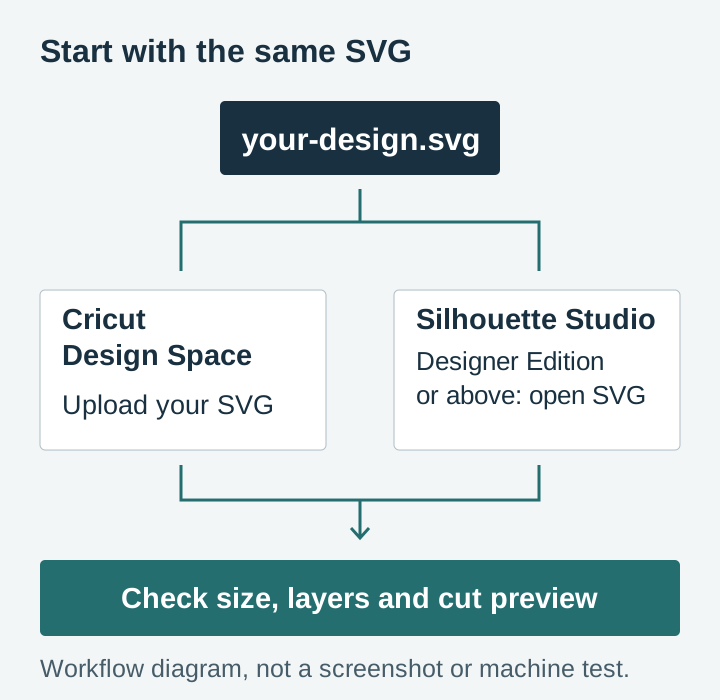
Short answer: buy Cricut if you want the easiest start and you mostly cut ready-made SVG designs, since Design Space imports them free. Buy Silhouette if you want deeper design tools, offline desktop software, and granular control, and you do not mind paying a one-time upgrade for SVG import.
The machines at a glance
Both companies refresh their lineups every couple of years, Cricut with the Explore and Maker lines, Silhouette with the Cameo and Portrait. Model numbers tick up, but the line-level differences below have stayed remarkably stable across generations. Prices are typical ranges, not quotes.
| Feature | Cricut (Explore / Maker) | Silhouette (Cameo) |
|---|---|---|
| Max cut width | Varies by model, mat and Smart Material | Varies by Cameo model and media |
| Max cut length | Up to 12 ft with compatible Smart Materials; shorter on a mat | Model and roll-feed setup dependent; check the current specification |
| Software | Design Space, free, cloud-based | Silhouette Studio, free, desktop |
| SVG import | Included free | Requires Designer Edition, a one-time upgrade of about fifty dollars |
| Print Then Cut | Built-in sensor | Print & Cut with registration marks, plus PixScan |
| Tools | Auto-detected tool clamp | Manual tool holder, auto-blade on newer models |
| Matless cutting | Yes, with Smart Materials | Yes, with a roll feeder for long media |
| Typical entry price | Low hundreds for Explore-class, more for Maker-class | Comparable, with the Portrait as a budget option |
Two rows in that table settle the question for a lot of people, so let's take them in turn.
Software: the real difference between the brands
The machines cut similarly. The software is where the philosophies split, and it is where you will spend most of your crafting time.
Cricut Design Space
Design Space is cloud-based. Your projects live online, open from any computer, tablet, or phone, and the interface walks you through every step with very little to configure. SVG upload is free and straightforward. For a beginner, the distance from unboxing to first finished decal is genuinely short.
The trade-offs mirror the strengths. It expects an internet connection, and its offline mode is limited. Its design tools cover the basics, resize, weld, slice, offset, but anyone wanting to build complex original designs will bump into the ceiling and end up designing in other software anyway. And because it is a cloud service, Cricut can and does change it on their schedule, not yours.
Silhouette Studio
Silhouette Studio is a desktop application in the traditional sense. It installs on your computer, works entirely offline, and packs a genuinely deep toolset: node editing, tracing, shadowing, sketch effects, features that approach a dedicated vector editor like Inkscape. People who design their own files often name Studio as the reason they chose Silhouette.
The catch that surprises everyone: the free Basic Edition does not open SVG files. SVG import requires the Designer Edition upgrade, a one-time purchase of about fifty dollars. If your crafting life revolves around purchased SVG designs, that is effectively part of the machine's price. Budget for it upfront rather than discovering it with a downloaded file you cannot open.
Verdict: Cricut is easier, Silhouette is deeper. If you mostly cut ready-made designs, both work well once set up, and Cricut's free SVG support is the practical tie-breaker. If you want to draw your own, Studio gives you far more room to grow.
Whichever you pick, our step-by-step guides cover the workflow: using SVG files in Cricut Design Space and using SVG files in Silhouette Studio.
 Dog Mom & Dog Dad Sayings Pack32 designs, commercial license included$3.99
Materials: near parity, different ecosystems
Both machines cut the core craft materials equally well: adhesive vinyl, heat transfer vinyl, cardstock, paper, sticker sheets, faux leather, and thin fabric. The top-tier machines on both sides, with the right blades, push into thicker stock like craft foam and balsa.
The difference is ecosystem philosophy. Cricut sells its own branded Smart Materials that feed directly into the machine without a mat, which is convenient and fast for long banners and batch work, at branded prices. Silhouette is more agnostic: it happily cuts whatever third-party rolls you feed it and never nudges you toward house-brand supplies.
Long cuts depend on the machine and material combination. Cricut documents cuts up to 12 feet with Smart Materials on compatible Explore and Maker machines. Compare that with the current roll-feed limits of the Cameo model you are considering. For banners and porch-sign stencils, also allow space in front of and behind the machine for the material to travel.
Print Then Cut: stickers and printed designs
If stickers, printed labels, or full-color designs are on your project list, this workflow deserves its own look. Both platforms print a design on your home inkjet, then cut precisely around it, but they register the cut differently.
Cricut prints a black box around your design and an onboard sensor finds it, aligns the cut, and gets on with it. It is close to foolproof and it is one of the strongest arguments for Cricut if stickers are your main event. The workflow leans on PNG files with transparent backgrounds, which is exactly why our packs always include them; our Print Then Cut guide walks through it.
Silhouette's Print & Cut uses printed registration marks read by an optical sensor, and it works well once you have the marks and margins set up correctly. Silhouette also offers PixScan, a special mat that lets the machine cut around something already printed or drawn, which Cricut has no real equivalent for. Net verdict: Cricut is smoother for routine sticker work, Silhouette is more flexible at the edges.
Beyond the flagships: the rest of each lineup
Both brands also sell machines above and below the mainstream models, and they change the comparison at the margins.
On the small end, the Cricut Joy line and the Silhouette Portrait are the budget compacts. The Joy is a genuinely tiny machine built around narrow Smart Materials, great for labels, cards, and small decals, and limiting beyond that. The Portrait is different in kind: it is essentially a narrower Cameo that runs the full Silhouette Studio software, so it trades width for none of the capability. As a cheap second machine or a dorm-room starter, the Portrait is one of the quiet bargains in the hobby.
On the high end, Cricut's Maker line carries an adaptive tool system with real specialty tools: a rotary blade that cuts unbonded fabric cleanly, a knife blade for thicker stock like balsa and chipboard, plus scoring, engraving, and debossing tips. If quilting or sewing is part of your plans, that rotary blade alone can settle the whole brand question. Silhouette's answer is the top-tier Cameo with higher cut force and its own accessory tools, strong but less specialized, with the ecosystem favoring vinyl and paper craft over fabric.
Ease of use versus control
Cricut is engineered to remove decisions. The machine detects which tool is loaded, the software suggests settings per material, and the guided workflow makes the first project nearly foolproof. The cost of that smoothness is that experienced users find fewer knobs to turn when a cut needs finessing.
Silhouette hands you the knobs. Blade depth, force, speed, and passes are all adjustable, which is powerful once you know what they do and a little bewildering before that. Newer Cameo models with auto-blade have softened the learning curve considerably, but the culture of the platform remains tinker-friendly.
Neither approach is wrong. Match it to your temperament: if you want the machine to just work, that is Cricut's whole design brief. If being unable to adjust something would drive you mad, you are a Silhouette person.
Cost of ownership over three years
Sticker price is the smallest part of this decision, because the machines are comparably priced tier for tier. The ongoing costs differ in shape.
Software: Design Space's core features are free, with an optional Cricut Access subscription that mainly adds Cricut's own image library. You do not need it if you buy designs elsewhere. Silhouette Studio Basic is free forever, with the one-time Designer Edition upgrade for SVG support. Neither platform charges a mandatory monthly fee to operate the machine.
Materials: this is where the real money goes on both platforms. Both brands sell premium house-brand supplies, and both machines cut cheaper third-party vinyl just as well. Buying generic rolls in bulk cuts your per-project cost dramatically no matter which logo is on the machine.
Designs: identical on both sides, and modest if you shop sensibly. Every pack in our catalog is $3.99 for dozens of designs with a commercial license included, and the same SVG cuts identically on either machine.
Blades and mats: both machines eat consumables at a similar pace. Blades dull, mats lose their stick, and both brands' replacements have solid third-party alternatives. Call it a wash.
One more durability note, since these machines outlive their model year. Both communities are enormous, so any error message or weird cut you hit has already been solved in a Facebook group or forum thread, and both brands have long track records of supporting older machines in current software. Used Cameos and Explores also hold value well, which makes the second-hand market a legitimate way to start on either platform.
Which machine for which crafter
Choose Cricut if you:
- Want the shortest path from unboxing to finished project
- Mostly cut purchased, ready-made SVG designs
- Like matless cutting and a polished guided workflow
- Want to run projects from a tablet or phone
- Would rather craft than configure
Choose Silhouette if you:
- Want serious built-in design tools and plan to create your own files
- Prefer offline desktop software you control
- Value granular control over blade, force, and speed
- Have checked that your chosen model and roll-feed setup fit your banners or large decals
- Already know your way around design software
What we see from the file side
We design cutting files for a living, and here is the perspective that vantage point gives: the machine brand almost never determines whether a project succeeds. The file does.
A well-built SVG, clean paths, sensible layer structure, no stray points, weeding-friendly stroke widths, cuts beautifully on both platforms. A messy auto-traced file fights you on both. Every design we ship is built and checked as a cutting file first, which is why the same pack works for the Cricut owner and the Cameo owner without either touching a node. If you are new to multi-layer designs, our guide to understanding SVG layers shows how the good ones are structured.
So if the brand decision has been keeping you from starting: it matters less than the forums make it feel. Pick the side whose software philosophy suits you and go make something.
 Split Monogram Designs50 designs, commercial license included$3.99
 Funny Cat Sayings48 designs, commercial license included$3.99
 Kids Name Sign Designs45 designs, commercial license included$3.99
What about laser engravers?
If your ambitions run past vinyl and cardstock, toward engraved wood, slate, and acrylic, that is a different tool category entirely. Cricut and Silhouette drag a blade; lasers burn with focused light, and many serious crafters eventually own one of each. When you are ready for that rabbit hole, start with our best laser engraver for beginners guide.
The bottom line
Cricut and Silhouette both make machines that will still be cutting cleanly years from now. Your finished products will owe far more to your design files, materials, and technique than to the logo on the lid.
Pick the platform that matches how you like to work, then stock your library. Every design in our shop ships as SVG, PNG, JPG, PDF, and EPS with a commercial license included, so whichever machine ends up on your craft table, it will have plenty to do.
Designs for this project
Frequently Asked Questions
Which is better for beginners, Cricut or Silhouette?
Cricut is easier to learn. Design Space is simple and intuitive, and SVG upload is included free. Silhouette Studio is more capable for original design work, but there is more to learn first.
Does Silhouette Studio open SVG files?
Not in the free Basic Edition. SVG import requires the Designer Edition upgrade, a one-time purchase of around fifty dollars. Cricut Design Space includes SVG support at no extra cost.
Does Cricut Design Space need an internet connection?
Mostly yes. Design Space is cloud-based, so projects save online and open from any device, but it expects a connection and its offline mode is limited. Silhouette Studio is a desktop application and needs no internet at all.
Which machine handles longer material?
It depends on the exact model and material. Compatible Cricut Explore and Maker machines support Smart Materials cuts up to 12 feet long; Cameo models can support long roll-fed cuts too. Compare the current specifications for the machines and materials you plan to use, rather than assuming a brand-wide winner.
If I mostly use ready-made SVG files, does the choice matter?
Less than you would expect. Both machines cut pre-made design files equally well. The practical tie-breaker is that Cricut includes SVG support for free while Silhouette charges for it.